The job's done.
Send the invoice.
When you finish a blast job in BlastBid, one tap turns it into an invoice. Line items carry over from the estimate. Your logo, your business name, your contact info are already on it. Preview, send, done.
No retyping. No chasing down what you quoted three weeks ago. No switching to a second app to bill the customer.
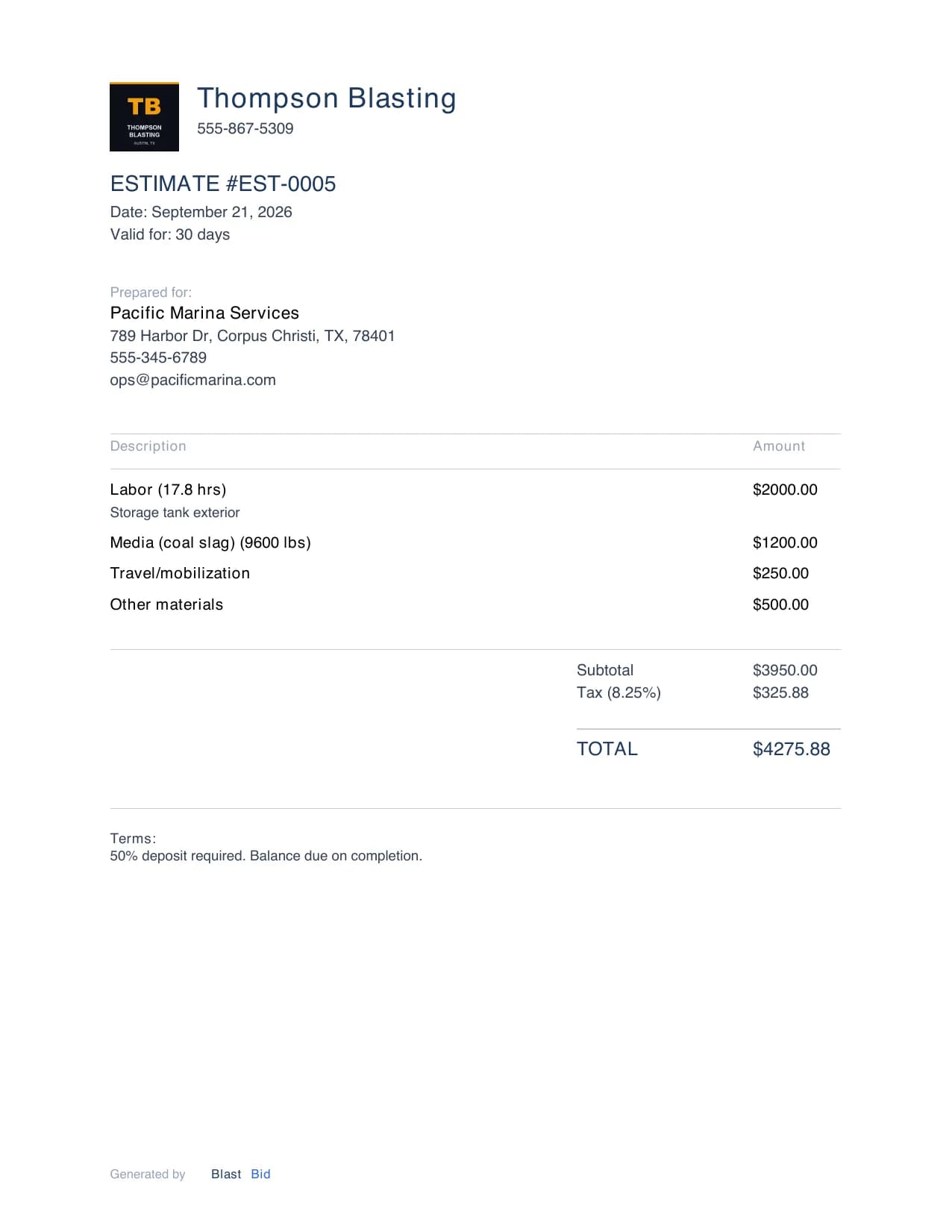
Estimate to invoice, one thread
BlastBid keeps the whole job on one thread. The estimate becomes a job. The job becomes an invoice. Nothing gets lost between steps.
- 01
Estimate accepted
Customer says yes. The estimate converts to an active job with one tap. All the line items, media, hours, and pricing carry forward.
- 02
Job complete
Mark it done. Enter actual hours and media used if you want to track how your estimate compared to reality.
- 03
Invoice sent
One tap creates the invoice from the job. Line items are already filled in. Add or edit anything, then send it by text, email, or the share sheet.
- 04
Paid
Mark it paid with the method the customer used: cash, check, Venmo, Zelle, or Stripe. The job closes out and the revenue shows up in your totals.
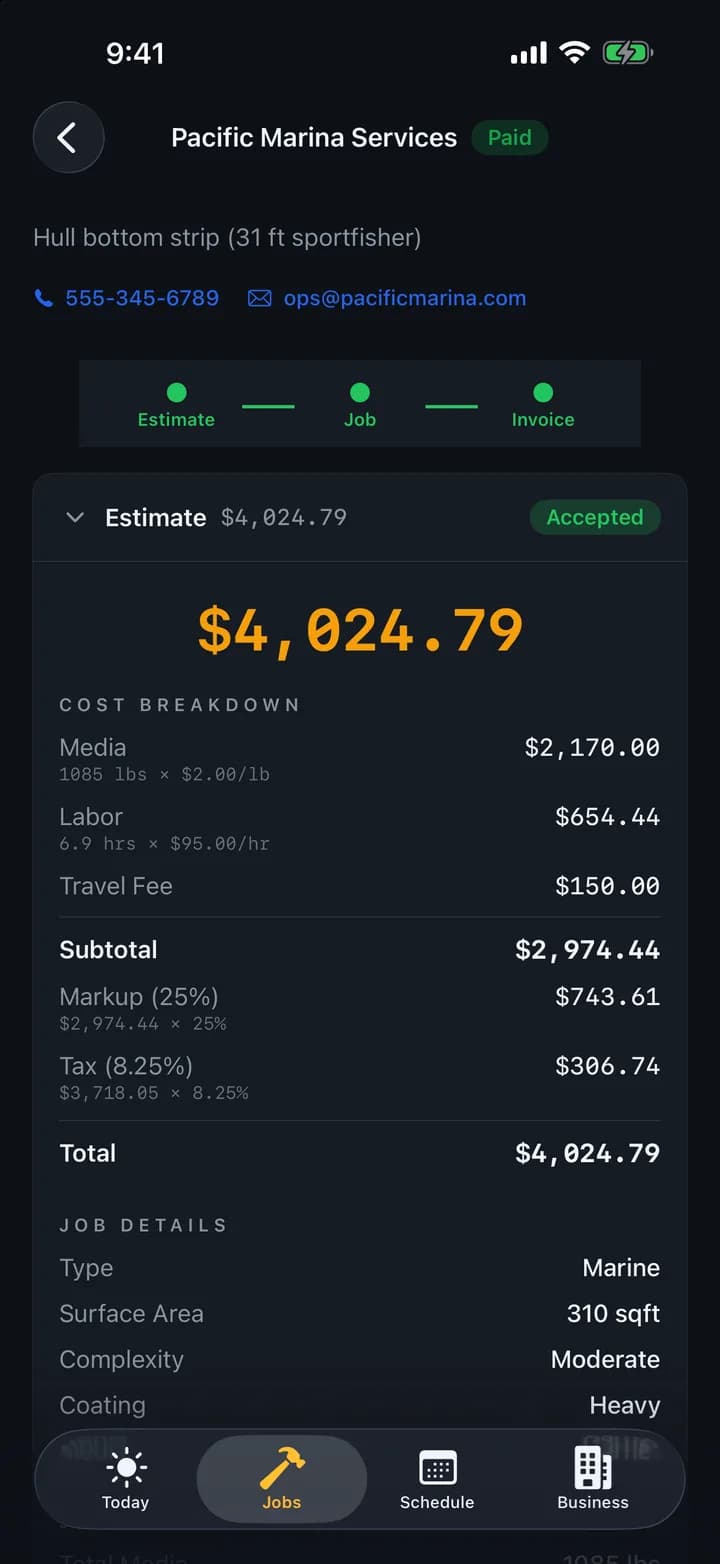
What's on the PDF
A clean, professional document that looks like you've been doing this for twenty years. Server-rendered, so the layout is the same every time.
Your branding
- Your logo, business name, and contact info
- Customer name and address
- Invoice number and date
- Payment terms (due on receipt, net 15, net 30)
Line items and totals
- Itemized line items from the estimate
- Media, labor, travel, and other costs broken out
- Tax rate applied from your settings
- Subtotal, tax, and total
Why not just use QuickBooks or Wave?
You can. If all you need is a blank invoice with your logo on it, QuickBooks and Wave both work. Plenty of blasters use them.
The difference is the line items. In QuickBooks you start from scratch every time. In BlastBid, the invoice starts from the estimate that started from the job. Media, labor, travel, markup, it's all already there. You're not retyping “coal slag, 4,000 lbs” into a generic invoice template.
And the estimate, the job, the photos, and the invoice all live on one thread per customer. Six months from now when you need to look up what you charged for a job, it's all in one place instead of split across two apps and your camera roll.
Common questions
How do I turn a finished job into an invoice?
One tap. The invoice pulls the line items straight from the estimate, with your logo, business name, and contact info already on it. Edit anything, then send it.
Do I have to retype what I quoted?
No. Media, labor, travel, and markup carry over from the estimate that became the job. You are not retyping coal slag, 4,000 lbs into a blank template.
How do customers pay?
However they already pay you: cash, check, Venmo, Zelle, or Stripe. You mark the invoice paid with the method they used and the job closes out. BlastBid tracks the payment, it does not force your customer through a payment link.
Can I send an invoice from the job site?
Yes. Build it offline and it queues on your phone, then sends the moment you are back in signal. You can send by text, email, or the share sheet.
Why not just use QuickBooks or Wave?
You can, and plenty of blasters do. The difference is the line items. In QuickBooks you start from a blank invoice every time. In BlastBid the invoice starts from the estimate that started from the job, and the estimate, photos, and invoice all live on one thread per customer.